BUILT BY A PHOTOGRAPHER · RUNNING BOOTHS SINCE 2013
Your iPad. Your printer. Nothing in between.
Patifot sends each print from the iPad straight to a DNP QW410 over one USB cable. The booth needs no laptop and no print server, and a guest goes from pose to print in under a minute.
REGISTRATION IS OPEN · FREE TRIAL WEEK ON ONE iPAD
GENERATED ILLUSTRATION · FICTIONAL PEOPLE
THE ENTIRE SETUP
iPAD AIR 13″ · THE BOOTH
laptopprint serverjust USBUSB-C · DIRECT TO THE PRINTER
DNP QW410
guest photo · 10×15
PRINT · SECONDS LATER
DEMO ONLY: NO CAMERA IS USED AND NOTHING IS PRINTED OR SENT. THE PHOTOS ARE GENERATED ILLUSTRATIONS.
< 60s
from pose to print
0
laptops in your booth cabinet
4
print formats on the QW410
1 TO 1,000
guests, birthday to corporate
EXAMPLES · FOUR EVENTS
Four kinds of events, one booth
Illustrations of four typical events, generated for this page. The people and events are made up: these are not client photos, testimonials or screenshots of the app.
GENERATED ILLUSTRATION
Evening partyFriends pose in front of the iPad at an evening party.
GENERATED ILLUSTRATION
Corporate eventColleagues at a company reception.
GENERATED ILLUSTRATION
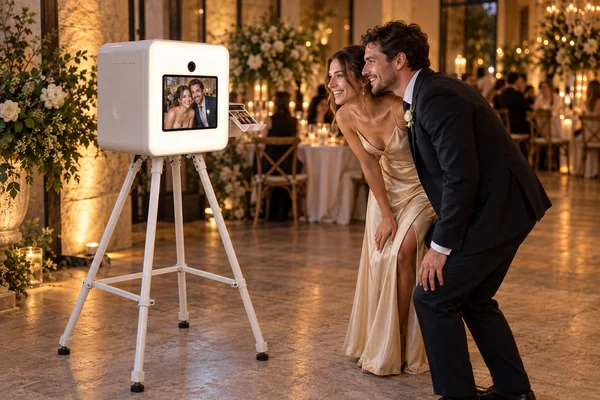
WeddingThe couple and friends at a garden wedding.
GENERATED ILLUSTRATION
Children's birthdayA children's birthday party in the garden.
TWO WAYS TO RUN IT
Use just an iPad, or put it into a modern ultra-compact photo booth
Patifot is the app. It runs on an iPad and prints to a DNP QW410. What goes around them is your choice.
GENERATED ILLUSTRATION
Just an iPad
The iPad on a stand next to the printer. This is everything Patifot needs.
GENERATED ILLUSTRATION
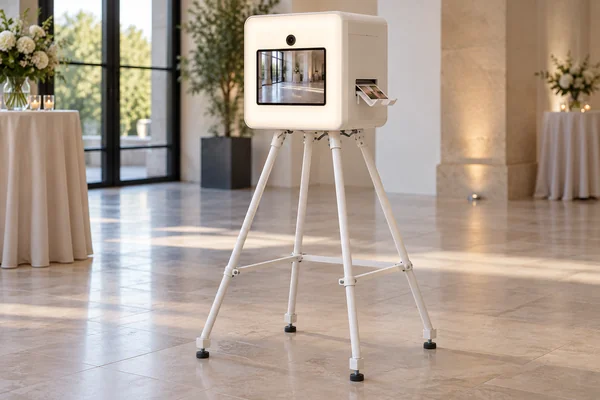
Ultra-compact photo booth
A white glossy body on slim legs. The whole front is a softly glowing light panel with the iPad set into it, and the prints come out at the side.
The booth is an optional enclosure. The app and the DNP QW410 work the same way with or without it. All images in this section are generated illustrations with fictional people.
CLASSIC MODE · FOUR PRINT FORMATS
One booth, four ways to leave with a print
Every photo gets your event frame, and the guest sees the framed result before it prints. You pick the print format for each event in the dashboard, and the booth follows the version you publish.
10×15 full sheet
Your frame fills the whole sheet, with one shot or several.
Three 5×10 strips
The printer cuts one sheet into three identical strips, so three guests each keep a copy.
10×10 square with a 5×10 strip
A square photo, plus a strip you can fill with your client's logo or message.
Two 7.5×10 halves
One shot, two identical prints. The printer cuts the sheet in half and two guests each keep one.
DIRECT USB PRINTING
The iPad talks to the QW410 directly.
The app drives the DNP QW410 over one USB-C cable, with no computer in between. It sends each job itself and tells the printer where to cut strips and halves.
LAPTOPPRINT SERVERDRIVER PANIC AT 23:40ONE USB-C CABLE
DNP QW410
Prints the full 10×15 sheet, three 5×10 strips, a 10×10 square with a 5×10 strip, or two 7.5×10 halves.
iPad with an M chip
Any iPad with an Apple M-series chip and iPadOS 17 or later. The app needs it to drive the printer over USB.
VENUE WI-FI, 23:15
VENUE WI-FIDOWN
CAPTURE + FRAMESON iPAD
PRINTING OVER USBON iPAD
EVENT SETUPSAVED
WORKS OFFLINE
Bad venue Wi-Fi is not your problem
Before the doors open, while it is online, the iPad downloads the event setup and its permission to run the event. From then on, capture, framing and printing run on the iPad: when the connection drops, the booth keeps shooting and printing, and photos upload once the network comes back.
WEB DASHBOARD
Prepare the whole event from your desk
Upload the frame and the idle screen, pick the print format and publish. Booths pick up the published version on their own, and you can see which version each iPad runs. Every iPad working at the same time uses one booth seat.
api.patifot.app/portal · Dupont wedding · Sat 21 Jun
FRAME CHECK
frame.png · 10×15
✓RESOLUTION 300 DPI
✓TRANSPARENCY OK
✓SAFE PRINT ZONES
NOTIFICATIONS
BOOTH 02 · PAPER LOW21:48
BOOTH 01 · PRINTER READY21:52 ●
SENT BY E-MAIL
BOOTHS
BOOTH 01 · iPAD AIRv.12 ●
BOOTH 02 · iPAD AIRv.12 ●
BOOTH 03 · iPAD PROv.11 ○
PUBLISH EVENT
THE IDLE SCREEN CAN SHOW YOUR CLIENT'S IMAGE OR VIDEO. THE PATIFOT PRIVACY NOTICE STAYS VISIBLE.
GUEST PRIVACY
The event keeps its photos. Nobody builds a face index.
ZIP
Closed event archive
Photos go into a closed archive in the EU for the operator or the event host. There is no public gallery, and guests do not get photos by QR code or PIN.
90d
Deleted on a fixed date
We delete event photos from our servers 90 days after the later of two dates: the end of the event day in local time and the last confirmed upload.
✓
Notice before the camera starts
The camera starts only after the guest has seen the privacy notice and pressed Start shooting.
WHY IT WORKS
Built by a photographer who ran the booths himself
Each feature comes from a real event, from a living-room birthday to a corporate night for 1,000 guests. Thirteen years of setting up booths, and of fixing printer drivers at the worst possible moment, went into this app.
2013
First booth built, first wedding shot
2016
A small fleet, every weekend booked
2019
Corporate nights for 1,000 guests
2023
Fed up with laptop rigs, Patifot begins
2026
Patifot for iPad prints to DNP over USB
PRICING
One plan, one iPad included
Patifot sells a software subscription only. You use your own iPad and DNP printer: we do not sell or ship any equipment. Prices exclude VAT.
Weekly
€9 / week
EXCL. VAT · ONE iPAD INCLUDED
✓Renews every week until you cancel
✓Classic mode and all four QW410 print formats
✓Dashboard, closed EU archive and notifications
✓Support by e-mail
Monthly
€29 / month
EXCL. VAT · ONE iPAD INCLUDED
✓Renews every month until you cancel
✓Classic mode and all four QW410 print formats
✓Dashboard, closed EU archive and notifications
✓Support by e-mail
Free trial week. Try Patifot for 7 days on one iPad, without a payment card. You start the trial in your dashboard. The offer stays open for 14 days, and the 7 days start when the first iPad claims it. Each company account, iPad and Apple Account can have one trial. When the week ends we charge nothing, and the booth stops until you choose a plan.
Cancel in the dashboard at any time: the cancellation takes effect at the end of the period you have paid for. Need more iPads working at the same time? Write to [email protected]. Details are on the pricing page.
Our order process is conducted by our online reseller Paddle.com. Paddle.com is the Merchant of Record for all our orders. Paddle provides all customer service inquiries and handles returns. VAT is added at checkout where applicable.
Booth-ready in an afternoon
Plug the printer into the iPad and publish your event from the dashboard. That is the whole setup.